
Getting Market Data From Databento
Market Replay plays market data you download yourself. This guide shows how to get the right data from Databento, a market data vendor that sells historical data pay as you go — you pay only for what you download, with no subscription.
Trandence is not affiliated with Databento. Data you buy is licensed to you by Databento under its terms, and it stays in your browser: Trandence never receives it.
The Quick Way: Trandence Tick Downloader
Trandence Tick Downloader is a free, open-source app for Windows and macOS that downloads the data with your own Databento API key — no portal forms, and no waiting hours for the files to be prepared.
- Create a Databento account and add a payment method, as in Step 1. Then, in the portal, open API Keys and copy your key.
- Install the app. Windows: get it from the Microsoft Store. macOS: download the
.dmgfrom the latest release — it is not code-signed yet, so right-click the app in Applications and choose Open. - Paste the API key and save it. It is kept in your computer’s credential store and sent only to Databento.
- Enter the ticker and the trading day. The app asks Databento for the price of each of the 13 exchanges; untick the ones you do not want — see Which Exchanges To Download.
- Choose a folder and click Download. The button shows how many files you are buying and what they cost.
- Import the
.csv.zstfiles into Market Replay as they are, as in Step 5. Keep them where they are until the import has finished.
The files are the same ones the Databento portal gives, with the same names, and each covers the trading day from 04:00 to 20:00 New York time. You pay Databento directly; Trandence never sees your key or your data.
Prefer the Databento portal? The steps below show how to get the same files there.
What To Download
Market Replay needs MBP-10 data — every trade and every change to the 10 best price levels on both sides of the book. That is what the order book, the tape and the candles are built from.
| Setting | Choose |
|---|---|
| Dataset (exchange) | NYSE Arca, Nasdaq and Cboe EDGX cover most of the volume — see Which Exchanges To Download |
| Schema | MBP-10 |
| Time range | One or more trading days |
| Encoding | CSV |
| Compression | zstd |
| Everything else | Leave as it is |
Step 1: Create An Account
Sign up at databento.com and add a payment method under Billing. The usage-based plan is enough — the monthly plans are not needed for Market Replay.
Step 2: Check The Price
In the portal, open Data catalog → Databento US Equities → Pricing. Under Usage-based, enter the symbol, choose MBP-10 and set the date. The estimate appears below, before you commit to anything.
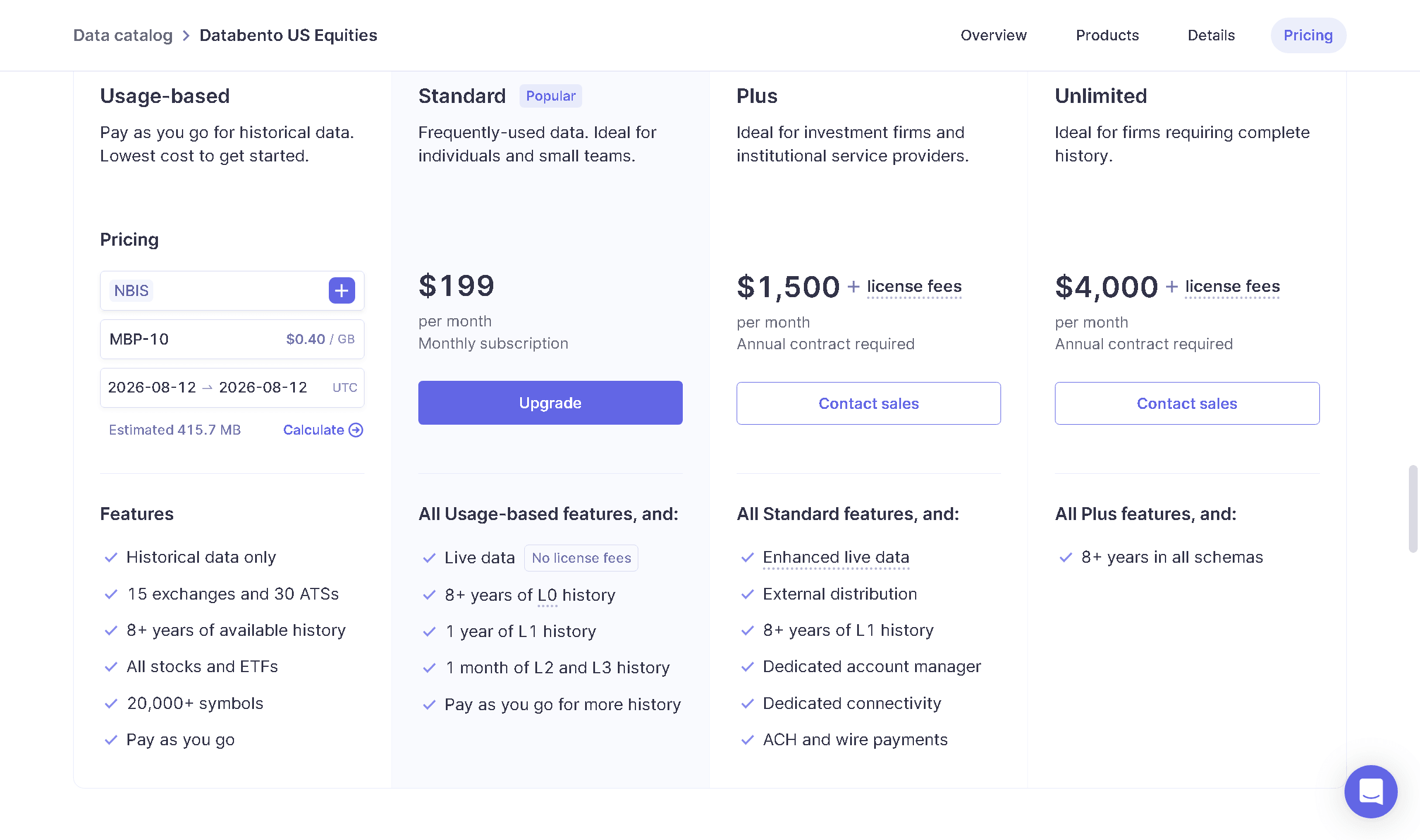
Size — and so price — depends on how actively the stock traded that day: a busy momentum stock produces far more book updates than a quiet one. At the time of writing, MBP-10 cost $0.40 per GB, and one day of NBIS on Nasdaq was estimated at about 416 MB, roughly $0.15. The portal always shows the current price before you submit.
Step 3: Choose The Exchange, Schema And Days
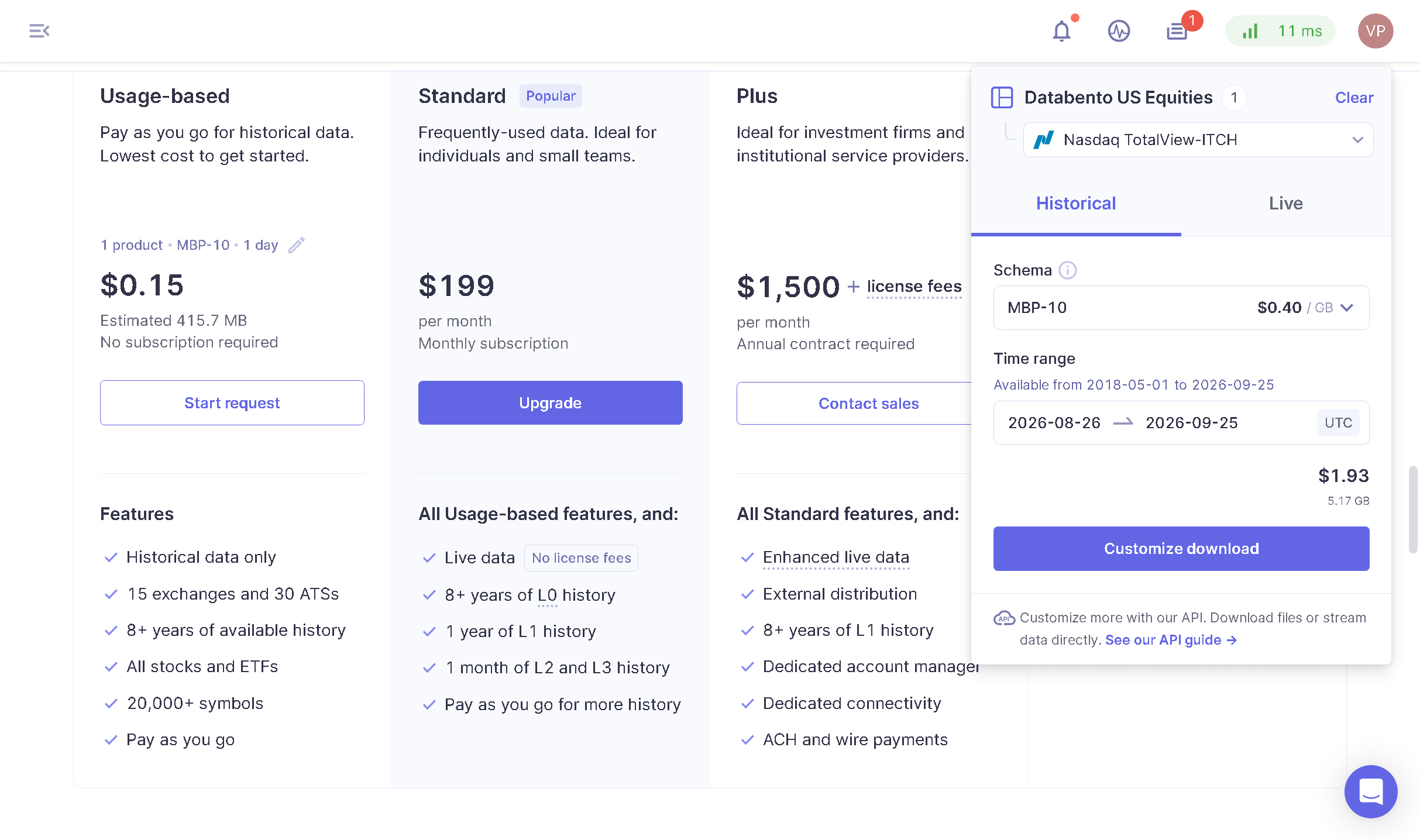
Click Start request. In the panel that opens:
- Under Databento US Equities, pick the exchange. NYSE Arca Integrated usually carries the most volume, with Nasdaq TotalView-ITCH next — either is a good one to start with. See Which Exchanges To Download.
- Set Schema to MBP-10.
- Set the Time range (UTC).
- Click Customize download.
Choosing The Time Range
- For one day, set the same date as start and end, for example
2026-08-12 → 2026-08-12. That covers the whole session, pre-market and after-hours included. - The end date is included.
2026-08-26 → 2026-08-27downloads two days, not one. - A longer range is fine: Databento delivers one file per day, and Trandence saves every day as its own replay. For a long period, import a few days at a time.
Which Exchanges To Download
A stock trades on many exchanges at once, and each exchange’s data is a separate file. The more of them you import, the more of the day’s trading the replay shows — but a few exchanges carry most of it.
This is how the traded volume of a typical day split between the exchanges in our own sample: 22 trading days of 16 stocks, mostly small-cap momentum names, between January and August 2026.
| Exchange | Dataset | Share of exchange volume | Running total |
|---|---|---|---|
| NYSE Arca Integrated | ARCX.PILLAR | ~41% (29–54%) | ~41% |
| Nasdaq TotalView-ITCH | XNAS.ITCH | ~21% (9–28%) | ~62% |
| Cboe EDGX Depth | EDGX.PITCH | ~18% (10–34%) | ~80% |
| MEMX MEMOIR Depth | MEMX.MEMOIR | ~7% (4–17%) | ~87% |
| Cboe BZX Depth | BATS.PITCH | ~5% (3–10%) | ~92% |
| MIAX Pearl Depth of Market | EPRL.DOM | ~3% | ~95% |
| Cboe EDGA Depth | EDGA.PITCH | ~2% | ~96% |
| NYSE Integrated | XNYS.PILLAR | ~1.5% | ~98% |
| Cboe BYX Depth | BATY.PITCH | ~1% | ~99% |
| Nasdaq Texas TotalView-ITCH | XBOS.ITCH | under 1% | |
| NYSE American Integrated | XASE.PILLAR | under 1% | |
| Nasdaq PSX TotalView-ITCH | XPSX.ITCH | under 1% | |
| NYSE Texas Integrated | XCHI.PILLAR | under 1% |
In practice:
- NYSE Arca, Nasdaq and Cboe EDGX cover about 80% of what trades on exchanges — a good default.
- Adding MEMX and Cboe BZX brings it to about 92%.
- The rest add little volume each, but complete the order book at every price.
You do not have to decide up front: start with one or two exchanges and add more of the same day later — Trandence adds them to the replay you already saved.
These figures are a guide, not a rule. They were measured in September 2026 and will change as exchanges win and lose market share. They also differ from stock to stock and day to day — see the ranges in brackets — and larger stocks listed on NYSE tend to trade more on NYSE itself than the small caps in our sample did.
Not everything trades on an exchange. Roughly 40% or more of US stock volume is executed off exchange — in dark pools and by wholesalers — and those trades are not in any exchange’s data. Even with all 13 exchanges, the replay’s volume is lower than the consolidated volume your trading platform shows.
Skip Blue Ocean ATS (overnight session only), IEX TOPS, Nasdaq Basic, NYSE National Trades and BBO, and the Databento US Equities Mini and Summary datasets — they carry no full order book.
Step 4: Set The Download Format
In Batch download, check the Data selection at the top, then under Basic customization:
- Encoding: CSV. Databento Binary Encoding (DBN) and JSON are not supported yet.
- Compression: zstd. The files are several times smaller, and Trandence reads them as they are — no need to unpack.
- Delivery method: Direct download.
Leave Advanced customization as it is: split by day, decimal prices, ISO 8601 timestamps and the symbol field. Trandence reads the symbol from the files, so you will not have to type it.
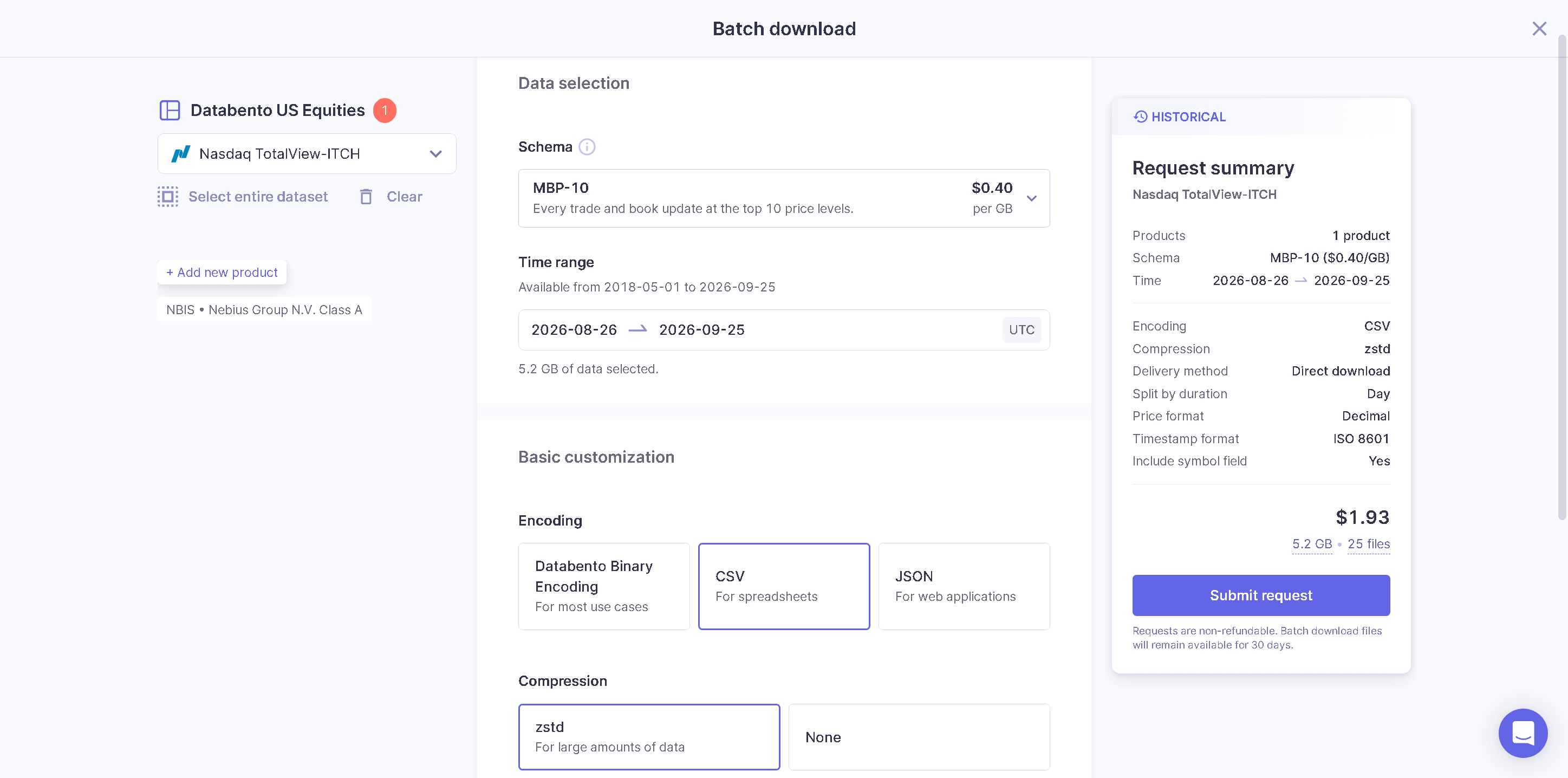
Check the Request summary on the right and click Submit request. Databento notes that requests are non-refundable, so check the symbol and dates first.
The files are not ready at once. After you submit, Databento prepares the files on its side, and this can take several hours — longer for many days or many exchanges. The request’s status is shown in the Download center; come back when it is done.
Step 5: Download And Import
- When the request is ready — which can take several hours — open Download center in the portal and download the files. Each day comes as a file named like
xnas-itch-20260812.mbp-10.csv.zst, together with a few.jsonfiles you do not need. - In Trandence, open Market Replay → Import data and add the
.csv.zstfiles. You can add several exchanges of the same day at once, or add more to a saved day later. - Click Check files, review the day, exchanges and records, and click Import.
See Market Replay for the import checks and the player.
Wrong Schema Or Format?
If the import rejects a file, it says what the file is. The usual fixes:
| You downloaded | Download instead |
|---|---|
| MBO | MBP-10 — MBO is order-by-order data |
| MBP-1, BBO or TBBO | MBP-10 — these have only the best bid and ask |
| Trades | MBP-10 — trades alone have no order book |
| OHLCV | MBP-10 — candles have no order book |
| DBN or JSON encoding | The same data with CSV encoding |
Need Help?
Questions about Getting Market Data From Databento? We answer within one business day.